> ## Documentation Index
> Fetch the complete documentation index at: https://docs-staging-chore-management-api-autoupdate.mintlify.site/llms.txt
> Use this file to discover all available pages before exploring further.

> 外部 API やサービスへの HTTP リクエストを認可するための、HTTP Vault 接続の設定方法を学びます。

# HTTP Vault 接続

<h2 id="configure-your-http-vault-connection-options">
  HTTP Vault 接続オプションを設定する
</h2>

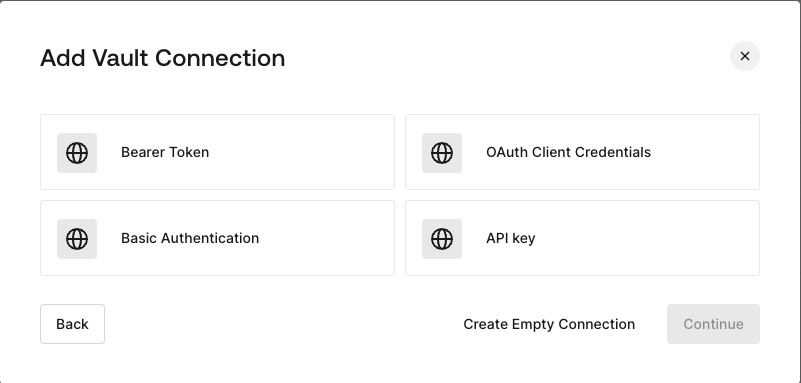
HTTP Vault 接続ではさまざまな認証オプションを設定でき、HTTP Request フローの Actions で利用できます。
<Frame>
  <img src="https://mintcdn.com/docs-staging-chore-management-api-autoupdate/CHcdW8myicgKbZ7q/docs/images/customize/forms/vaults/http-vault-connection-options.png?fit=max&auto=format&n=CHcdW8myicgKbZ7q&q=85&s=68af6cde4d62cb03fd752d30cb877021" alt="Auth0 Dashboard > Actions > フォーム > Vault > HTTP" data-og-width="801" width="801" data-og-height="383" height="383" data-path="docs/images/customize/forms/vaults/http-vault-connection-options.png" data-optimize="true" data-opv="3" srcset="https://mintcdn.com/docs-staging-chore-management-api-autoupdate/CHcdW8myicgKbZ7q/docs/images/customize/forms/vaults/http-vault-connection-options.png?w=280&fit=max&auto=format&n=CHcdW8myicgKbZ7q&q=85&s=f6733a071e411874ea37ffce2316547c 280w, https://mintcdn.com/docs-staging-chore-management-api-autoupdate/CHcdW8myicgKbZ7q/docs/images/customize/forms/vaults/http-vault-connection-options.png?w=560&fit=max&auto=format&n=CHcdW8myicgKbZ7q&q=85&s=458931986a4b49c6d5e14aff7ef1e5b0 560w, https://mintcdn.com/docs-staging-chore-management-api-autoupdate/CHcdW8myicgKbZ7q/docs/images/customize/forms/vaults/http-vault-connection-options.png?w=840&fit=max&auto=format&n=CHcdW8myicgKbZ7q&q=85&s=6aea6cdef4c976667312afbfbd1d9f4e 840w, https://mintcdn.com/docs-staging-chore-management-api-autoupdate/CHcdW8myicgKbZ7q/docs/images/customize/forms/vaults/http-vault-connection-options.png?w=1100&fit=max&auto=format&n=CHcdW8myicgKbZ7q&q=85&s=7e394f84688bc923d59546befbc6f486 1100w, https://mintcdn.com/docs-staging-chore-management-api-autoupdate/CHcdW8myicgKbZ7q/docs/images/customize/forms/vaults/http-vault-connection-options.png?w=1650&fit=max&auto=format&n=CHcdW8myicgKbZ7q&q=85&s=c8ff9b4bb76bba95d68ab64bb3874c0c 1650w, https://mintcdn.com/docs-staging-chore-management-api-autoupdate/CHcdW8myicgKbZ7q/docs/images/customize/forms/vaults/http-vault-connection-options.png?w=2500&fit=max&auto=format&n=CHcdW8myicgKbZ7q&q=85&s=c742410b0d4d39e6ba5811c7df2a3cf3 2500w" />
</Frame>

<h2 id="configure-your-http-vault-connection-for-bearer-token">
  Bearer Token 用の HTTP Vault 接続を設定する
</h2>

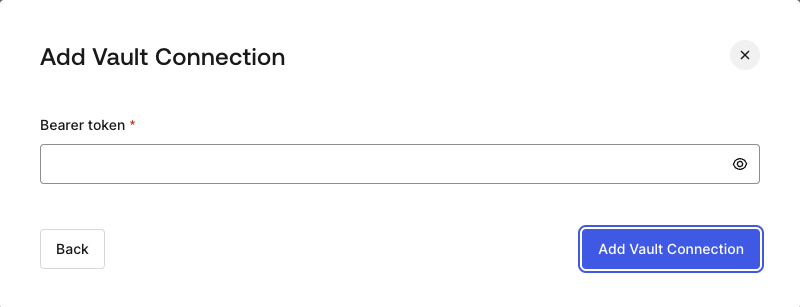
**Bearer Token** 認証を使用する HTTP Vault 接続を設定するには、必要なパラメーターを設定します。
<Frame>
  <img src="https://mintcdn.com/docs-staging-chore-management-api-autoupdate/CHcdW8myicgKbZ7q/docs/images/customize/forms/vaults/http-vault-connection-bearer-token.png?fit=max&auto=format&n=CHcdW8myicgKbZ7q&q=85&s=271f7a2c6d9301990fb080f4c63fb4ed" alt="Auth0 Dashboard > Actions > フォーム > Vault > HTTP" data-og-width="800" width="800" data-og-height="307" height="307" data-path="docs/images/customize/forms/vaults/http-vault-connection-bearer-token.png" data-optimize="true" data-opv="3" srcset="https://mintcdn.com/docs-staging-chore-management-api-autoupdate/CHcdW8myicgKbZ7q/docs/images/customize/forms/vaults/http-vault-connection-bearer-token.png?w=280&fit=max&auto=format&n=CHcdW8myicgKbZ7q&q=85&s=a978995147ad9158e70987da595a3c6f 280w, https://mintcdn.com/docs-staging-chore-management-api-autoupdate/CHcdW8myicgKbZ7q/docs/images/customize/forms/vaults/http-vault-connection-bearer-token.png?w=560&fit=max&auto=format&n=CHcdW8myicgKbZ7q&q=85&s=9b2fce556a9383de4702e4784885f5c2 560w, https://mintcdn.com/docs-staging-chore-management-api-autoupdate/CHcdW8myicgKbZ7q/docs/images/customize/forms/vaults/http-vault-connection-bearer-token.png?w=840&fit=max&auto=format&n=CHcdW8myicgKbZ7q&q=85&s=a5dcdac23967abe9d93f7f48971c10bd 840w, https://mintcdn.com/docs-staging-chore-management-api-autoupdate/CHcdW8myicgKbZ7q/docs/images/customize/forms/vaults/http-vault-connection-bearer-token.png?w=1100&fit=max&auto=format&n=CHcdW8myicgKbZ7q&q=85&s=b4669f5366f63e5cb536a5f920898da4 1100w, https://mintcdn.com/docs-staging-chore-management-api-autoupdate/CHcdW8myicgKbZ7q/docs/images/customize/forms/vaults/http-vault-connection-bearer-token.png?w=1650&fit=max&auto=format&n=CHcdW8myicgKbZ7q&q=85&s=ac9aadcdce53a74aebfeb19bd222a15c 1650w, https://mintcdn.com/docs-staging-chore-management-api-autoupdate/CHcdW8myicgKbZ7q/docs/images/customize/forms/vaults/http-vault-connection-bearer-token.png?w=2500&fit=max&auto=format&n=CHcdW8myicgKbZ7q&q=85&s=6ed453c0820061a30b392489c73a24d8 2500w" />
</Frame>

<h3 id="input-settings">
  入力設定
</h3>

| 項目           | 説明                    |
| ------------ | --------------------- |
| Bearer Token | 外部サービスの認可に使用する固定トークン。 |

<h2 id="configure-your-http-vault-connection-for-oauth-client-credentials">
  OAuth Client Credentials 向けに HTTP Vault 接続を設定する
</h2>

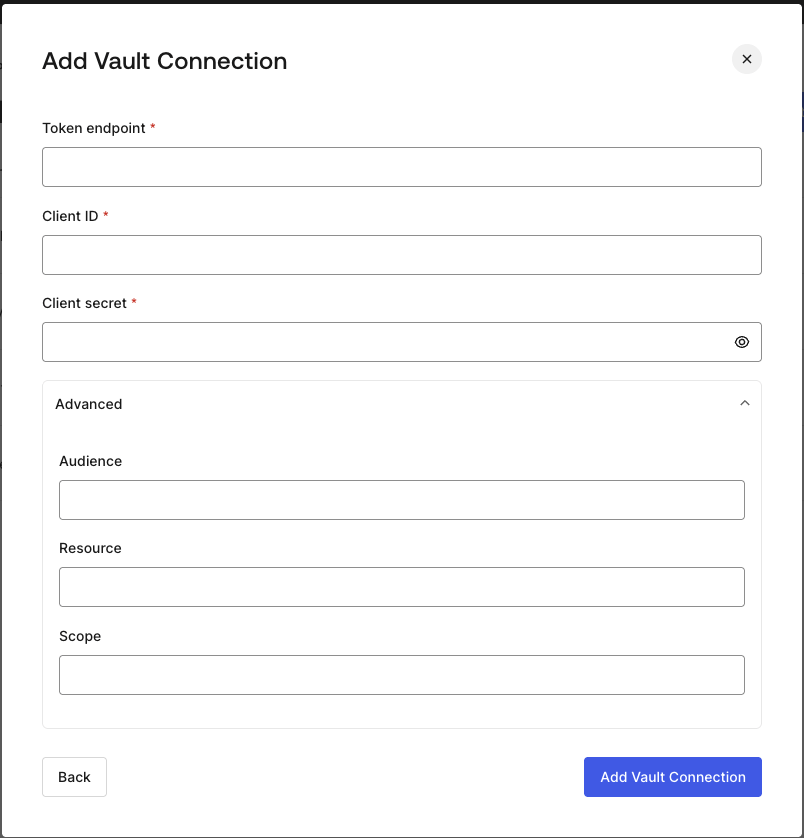
**Client Credentials** 認証を使用して HTTP Vault 接続を設定するには、必要なパラメーターを指定します。
<Frame>
  <img src="https://mintcdn.com/docs-staging-chore-management-api-autoupdate/CHcdW8myicgKbZ7q/docs/images/customize/forms/vaults/http-vault-connection-oauth-client-credentials.png?fit=max&auto=format&n=CHcdW8myicgKbZ7q&q=85&s=38d36de4b267e1d5be47d5b1fef114f5" alt="Auth0 Dashboard > Actions > フォーム > Vault > HTTP " data-og-width="804" width="804" data-og-height="838" height="838" data-path="docs/images/customize/forms/vaults/http-vault-connection-oauth-client-credentials.png" data-optimize="true" data-opv="3" srcset="https://mintcdn.com/docs-staging-chore-management-api-autoupdate/CHcdW8myicgKbZ7q/docs/images/customize/forms/vaults/http-vault-connection-oauth-client-credentials.png?w=280&fit=max&auto=format&n=CHcdW8myicgKbZ7q&q=85&s=034ca56055ee8c72c15c14cc7343f49a 280w, https://mintcdn.com/docs-staging-chore-management-api-autoupdate/CHcdW8myicgKbZ7q/docs/images/customize/forms/vaults/http-vault-connection-oauth-client-credentials.png?w=560&fit=max&auto=format&n=CHcdW8myicgKbZ7q&q=85&s=b438b5cef8d50a7bf2a85cec7f5cc8ac 560w, https://mintcdn.com/docs-staging-chore-management-api-autoupdate/CHcdW8myicgKbZ7q/docs/images/customize/forms/vaults/http-vault-connection-oauth-client-credentials.png?w=840&fit=max&auto=format&n=CHcdW8myicgKbZ7q&q=85&s=434d6d194694c5d7a0b60b20896bfdd7 840w, https://mintcdn.com/docs-staging-chore-management-api-autoupdate/CHcdW8myicgKbZ7q/docs/images/customize/forms/vaults/http-vault-connection-oauth-client-credentials.png?w=1100&fit=max&auto=format&n=CHcdW8myicgKbZ7q&q=85&s=b2f282c7da39304b0cc9c8da0f9e3095 1100w, https://mintcdn.com/docs-staging-chore-management-api-autoupdate/CHcdW8myicgKbZ7q/docs/images/customize/forms/vaults/http-vault-connection-oauth-client-credentials.png?w=1650&fit=max&auto=format&n=CHcdW8myicgKbZ7q&q=85&s=7d12fd6d2c4d4d60b267ac5f7df29a2b 1650w, https://mintcdn.com/docs-staging-chore-management-api-autoupdate/CHcdW8myicgKbZ7q/docs/images/customize/forms/vaults/http-vault-connection-oauth-client-credentials.png?w=2500&fit=max&auto=format&n=CHcdW8myicgKbZ7q&q=85&s=14c911fef4cc998b36f3379196e7cfc6 2500w" />
</Frame>

<h3 id="input-settings-2">
  入力設定
</h3>

| Parameter           | Description                                         |
| ------------------- | --------------------------------------------------- |
| Tenant Endpoint     | アクセストークンを発行する認可サーバーの Tenant Endpoint。               |
| Client ID           | カスタム API へのアクセスを認可された M2M アプリケーションの Client ID。      |
| Client Secret       | カスタム API へのアクセスを認可された M2M アプリケーションの Client Secret。  |
| Audience (Optional) | カスタム API の audience。通常は Auth0 で定義したカスタム API で使用します。 |
| Resource (Optional) | カスタム API の Resource。audience とほぼ同じ意味を持つ標準パラメーターです。  |
| Scope (Optional)    | スペース区切りの文字列形式で指定するスコープのリスト。                         |

<h2 id="configure-your-http-vault-connection-for-api-key">
  API Key 用の HTTP Vault 接続を設定する
</h2>

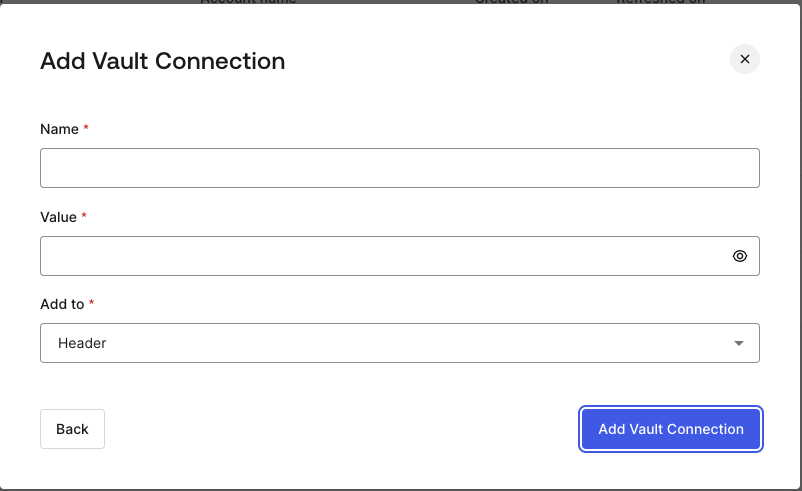
**API Key** 認証を使用して HTTP Vault 接続を設定するには、必要なパラメーターを指定します。
<Frame>
  <img src="https://mintcdn.com/docs-staging-chore-management-api-autoupdate/CHcdW8myicgKbZ7q/docs/images/customize/forms/vaults/http-vault-connection-api-key.png?fit=max&auto=format&n=CHcdW8myicgKbZ7q&q=85&s=f0ed467b41f25cc9458d4f182182b4ed" alt="Auth0 Dashboard > Actions > フォーム > Vault > HTTP " data-og-width="802" width="802" data-og-height="491" height="491" data-path="docs/images/customize/forms/vaults/http-vault-connection-api-key.png" data-optimize="true" data-opv="3" srcset="https://mintcdn.com/docs-staging-chore-management-api-autoupdate/CHcdW8myicgKbZ7q/docs/images/customize/forms/vaults/http-vault-connection-api-key.png?w=280&fit=max&auto=format&n=CHcdW8myicgKbZ7q&q=85&s=db5160dec38f57cbd9637c479bbe5862 280w, https://mintcdn.com/docs-staging-chore-management-api-autoupdate/CHcdW8myicgKbZ7q/docs/images/customize/forms/vaults/http-vault-connection-api-key.png?w=560&fit=max&auto=format&n=CHcdW8myicgKbZ7q&q=85&s=e3f6f25a24970ab89d20e4caaffdf053 560w, https://mintcdn.com/docs-staging-chore-management-api-autoupdate/CHcdW8myicgKbZ7q/docs/images/customize/forms/vaults/http-vault-connection-api-key.png?w=840&fit=max&auto=format&n=CHcdW8myicgKbZ7q&q=85&s=f4ad9a98ff8201b720cb9785e9989970 840w, https://mintcdn.com/docs-staging-chore-management-api-autoupdate/CHcdW8myicgKbZ7q/docs/images/customize/forms/vaults/http-vault-connection-api-key.png?w=1100&fit=max&auto=format&n=CHcdW8myicgKbZ7q&q=85&s=c7f0b3bda7b4da09a07fc430549a8530 1100w, https://mintcdn.com/docs-staging-chore-management-api-autoupdate/CHcdW8myicgKbZ7q/docs/images/customize/forms/vaults/http-vault-connection-api-key.png?w=1650&fit=max&auto=format&n=CHcdW8myicgKbZ7q&q=85&s=a2aad2fd14a1acbb301ffc8ef8edc8fa 1650w, https://mintcdn.com/docs-staging-chore-management-api-autoupdate/CHcdW8myicgKbZ7q/docs/images/customize/forms/vaults/http-vault-connection-api-key.png?w=2500&fit=max&auto=format&n=CHcdW8myicgKbZ7q&q=85&s=787bfb95944da41a20ea3b3793aa63b0 2500w" />
</Frame>

<h3 id="input-settings-3">
  入力設定
</h3>

| Parameter | Description                                                              |
| --------- | ------------------------------------------------------------------------ |
| Name      | Header またはクエリパラメータとして追加する API Key の名前。                                   |
| Value     | Header またはクエリパラメータとして追加する API Key の値。                                    |
| Add To    | デフォルトでは Header に追加されます。API Key を Header として追加するか、クエリパラメータとして追加するかを指定します。 |

<h2 id="configure-your-http-vault-connection-for-basic-authentication">
  Basic Authentication の HTTP Vault 接続を設定する
</h2>

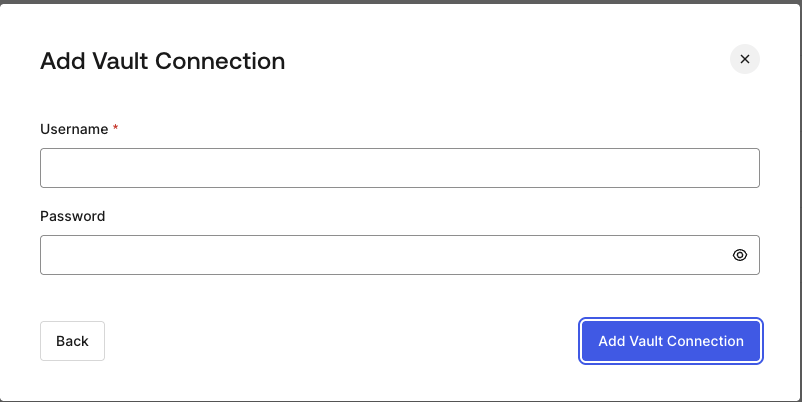
**Basic Auth** 認証を使用する HTTP Vault 接続を設定するには、必要なパラメーターを設定します。
<Frame>
  <img src="https://mintcdn.com/docs-staging-chore-management-api-autoupdate/CHcdW8myicgKbZ7q/docs/images/customize/forms/vaults/http-vault-connection-basic-authentication.png?fit=max&auto=format&n=CHcdW8myicgKbZ7q&q=85&s=02688b4a8840aab6b7a1d13660da28fd" alt="Auth0 Dashboard > Actions > フォーム > Vault > HTTP " data-og-width="802" width="802" data-og-height="402" height="402" data-path="docs/images/customize/forms/vaults/http-vault-connection-basic-authentication.png" data-optimize="true" data-opv="3" srcset="https://mintcdn.com/docs-staging-chore-management-api-autoupdate/CHcdW8myicgKbZ7q/docs/images/customize/forms/vaults/http-vault-connection-basic-authentication.png?w=280&fit=max&auto=format&n=CHcdW8myicgKbZ7q&q=85&s=5f521c98339af21f8cc3e7a33d95e6ff 280w, https://mintcdn.com/docs-staging-chore-management-api-autoupdate/CHcdW8myicgKbZ7q/docs/images/customize/forms/vaults/http-vault-connection-basic-authentication.png?w=560&fit=max&auto=format&n=CHcdW8myicgKbZ7q&q=85&s=5eef82f520c5981dc4e2c2584fbb5b9c 560w, https://mintcdn.com/docs-staging-chore-management-api-autoupdate/CHcdW8myicgKbZ7q/docs/images/customize/forms/vaults/http-vault-connection-basic-authentication.png?w=840&fit=max&auto=format&n=CHcdW8myicgKbZ7q&q=85&s=106b1c1c34a105d1b1bb61758f8f1df1 840w, https://mintcdn.com/docs-staging-chore-management-api-autoupdate/CHcdW8myicgKbZ7q/docs/images/customize/forms/vaults/http-vault-connection-basic-authentication.png?w=1100&fit=max&auto=format&n=CHcdW8myicgKbZ7q&q=85&s=e9c1e07f12d2ad7ed10b25db73fef2a4 1100w, https://mintcdn.com/docs-staging-chore-management-api-autoupdate/CHcdW8myicgKbZ7q/docs/images/customize/forms/vaults/http-vault-connection-basic-authentication.png?w=1650&fit=max&auto=format&n=CHcdW8myicgKbZ7q&q=85&s=027c08f24ff1f69bb965560854498d12 1650w, https://mintcdn.com/docs-staging-chore-management-api-autoupdate/CHcdW8myicgKbZ7q/docs/images/customize/forms/vaults/http-vault-connection-basic-authentication.png?w=2500&fit=max&auto=format&n=CHcdW8myicgKbZ7q&q=85&s=54da543a162370f4091e2430b0db71c3 2500w" />
</Frame>

<h3 id="input-settings-4">
  入力設定
</h3>

| Parameter | Description                                                  |
| --------- | ------------------------------------------------------------ |
| ユーザー名     | 連結してBase64エンコードし、Basic Authorization ヘッダーパラメーターとして追加するユーザー名。 |
| パスワード     | 連結してBase64エンコードし、Basic Authorization ヘッダーパラメーターとして追加するパスワード。 |

<Warning>
  Basic Auth が設定された HTTP Vault 接続は、現在 Flows HTTP Request Action に組み込まれているオプションを将来的に置き換える予定です。
</Warning>
