> ## Documentation Index
> Fetch the complete documentation index at: https://docs-staging-chore-management-api-autoupdate.mintlify.site/llms.txt
> Use this file to discover all available pages before exploring further.
# Rechercher des membres d’une organisation
> Utilisez User Search pour trouver des membres d’une Auth0 Organization à l’aide de requêtes qui filtrent les résultats selon l’appartenance à une organization, l’adresse courriel ou le type de connexion.
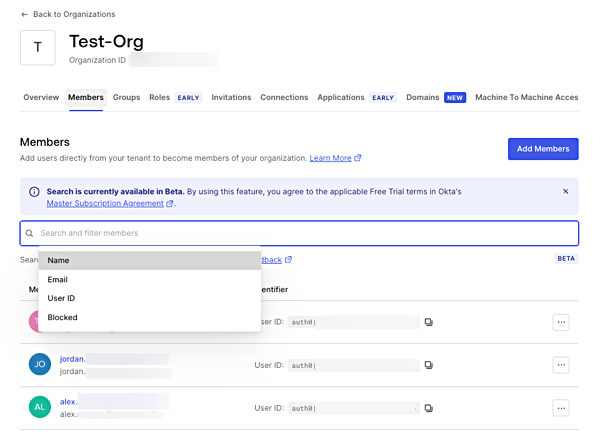
Vous pouvez rechercher et filtrer les membres d’une organization à l’aide de la fonctionnalité [Auth0 Dashboard Search](/docs/fr-ca/get-started/auth0-overview/dashboard/search-and-filter-auth0-dashboard#organization-members) ou de [User Search](/docs/fr-ca/manage-users/user-search).
La recherche du tableau de bord [filtre les membres d’une organization](https://manage.auth0.com/#/organizations) selon leur nom, leur adresse courriel, leur ID utilisateur ou leur statut de blocage, dans la section Organizations.
 [User Search](https://manage.auth0.com/#/users) vous permet de trouver, dans la section Users, des utilisateurs filtrés selon leur appartenance à une organization à l’aide du paramètre `organization_id`.
Le filtre suivant permet de trouver les utilisateurs dont le domaine de l’adresse courriel est `acme.com`, mais qui ne sont pas membres de l’organization Acme :
`email.domain:"acme.com" AND NOT organization_id:"ACME_ORG_ID"`
La requête suivante permet de trouver tous les utilisateurs membres de l’organization Acme qui se connectent à l’aide d’une connexion de base de données précise.
`organization_id:"ACME_ORG_ID" AND identities.connection:"my-db-connection-name"`
L’exemple suivant permet de trouver les utilisateurs dont l’adresse courriel commence par jane et qui sont membres de l’organization Acme.
`organization_id:"ACME_ORG_ID" AND email:jane*`
Pour en savoir plus, consultez [User Search](/docs/fr-ca/manage-users/user-search).
[User Search](https://manage.auth0.com/#/users) vous permet de trouver, dans la section Users, des utilisateurs filtrés selon leur appartenance à une organization à l’aide du paramètre `organization_id`.
Le filtre suivant permet de trouver les utilisateurs dont le domaine de l’adresse courriel est `acme.com`, mais qui ne sont pas membres de l’organization Acme :
`email.domain:"acme.com" AND NOT organization_id:"ACME_ORG_ID"`
La requête suivante permet de trouver tous les utilisateurs membres de l’organization Acme qui se connectent à l’aide d’une connexion de base de données précise.
`organization_id:"ACME_ORG_ID" AND identities.connection:"my-db-connection-name"`
L’exemple suivant permet de trouver les utilisateurs dont l’adresse courriel commence par jane et qui sont membres de l’organization Acme.
`organization_id:"ACME_ORG_ID" AND email:jane*`
Pour en savoir plus, consultez [User Search](/docs/fr-ca/manage-users/user-search).