> ## Documentation Index
> Fetch the complete documentation index at: https://docs-staging-chore-management-api-autoupdate.mintlify.site/llms.txt
> Use this file to discover all available pages before exploring further.

> Découvrez comment créer une logique côté serveur à l’aide de Flows afin d’ajouter une logique décisionnelle et des intégrations externes à Forms.

# Flows

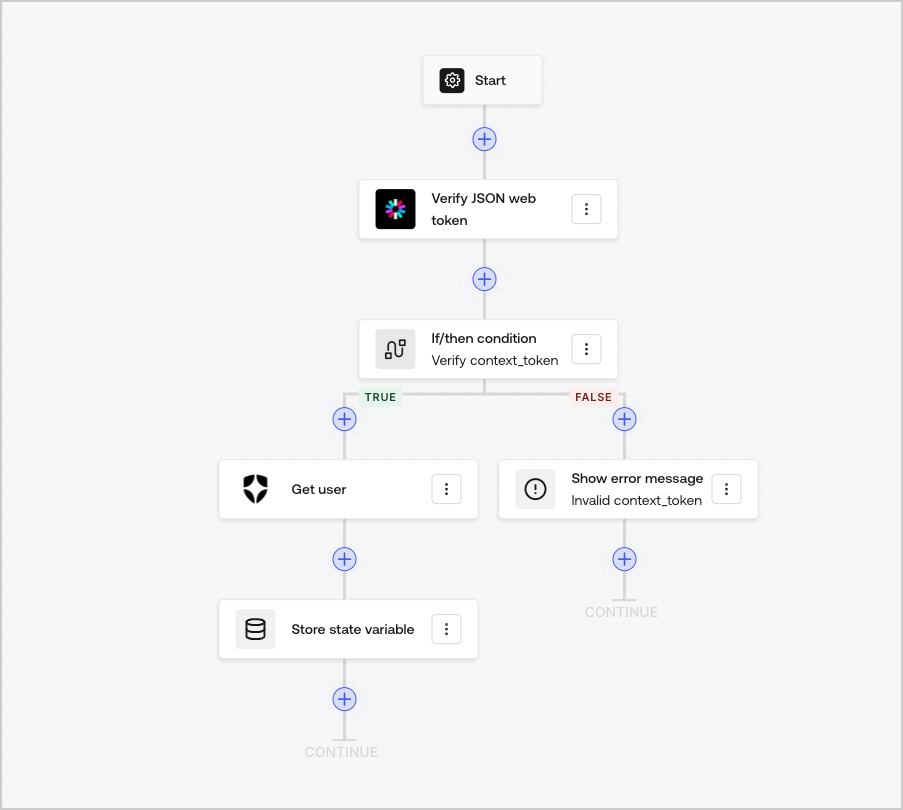
Flows vous permettent de créer visuellement la logique côté serveur que vous pouvez exécuter dans vos Forms pour traiter les données recueillies, intégrer n’importe quel service doté d’une API ou déclencher des automatisations.
<Frame>
  <img src="https://mintcdn.com/docs-staging-chore-management-api-autoupdate/oiDO-PkIrC6oywTQ/docs/images/cdy7uua7fh8z/6u6Huh5CbH3GEQJv3AH7cx/e49ea613b2c46a43c83c89ffecddbafe/Flows.png?fit=max&auto=format&n=oiDO-PkIrC6oywTQ&q=85&s=0bbfb38ccc9c8a9a469939e46ea8e846" alt="Dashboard > Forms > Flows" data-og-width="903" width="903" data-og-height="810" height="810" data-path="docs/images/cdy7uua7fh8z/6u6Huh5CbH3GEQJv3AH7cx/e49ea613b2c46a43c83c89ffecddbafe/Flows.png" data-optimize="true" data-opv="3" srcset="https://mintcdn.com/docs-staging-chore-management-api-autoupdate/oiDO-PkIrC6oywTQ/docs/images/cdy7uua7fh8z/6u6Huh5CbH3GEQJv3AH7cx/e49ea613b2c46a43c83c89ffecddbafe/Flows.png?w=280&fit=max&auto=format&n=oiDO-PkIrC6oywTQ&q=85&s=6895c00d93664f6744e8ecc1630ad5e0 280w, https://mintcdn.com/docs-staging-chore-management-api-autoupdate/oiDO-PkIrC6oywTQ/docs/images/cdy7uua7fh8z/6u6Huh5CbH3GEQJv3AH7cx/e49ea613b2c46a43c83c89ffecddbafe/Flows.png?w=560&fit=max&auto=format&n=oiDO-PkIrC6oywTQ&q=85&s=39ffffc5a833bf0979f4d9f55ebcf18d 560w, https://mintcdn.com/docs-staging-chore-management-api-autoupdate/oiDO-PkIrC6oywTQ/docs/images/cdy7uua7fh8z/6u6Huh5CbH3GEQJv3AH7cx/e49ea613b2c46a43c83c89ffecddbafe/Flows.png?w=840&fit=max&auto=format&n=oiDO-PkIrC6oywTQ&q=85&s=2f11733308b6803c375c682efcf35d0d 840w, https://mintcdn.com/docs-staging-chore-management-api-autoupdate/oiDO-PkIrC6oywTQ/docs/images/cdy7uua7fh8z/6u6Huh5CbH3GEQJv3AH7cx/e49ea613b2c46a43c83c89ffecddbafe/Flows.png?w=1100&fit=max&auto=format&n=oiDO-PkIrC6oywTQ&q=85&s=72edfa976c1321b15699a3b8b643cdb7 1100w, https://mintcdn.com/docs-staging-chore-management-api-autoupdate/oiDO-PkIrC6oywTQ/docs/images/cdy7uua7fh8z/6u6Huh5CbH3GEQJv3AH7cx/e49ea613b2c46a43c83c89ffecddbafe/Flows.png?w=1650&fit=max&auto=format&n=oiDO-PkIrC6oywTQ&q=85&s=2c2ceae029428f31266377cf90e1b56d 1650w, https://mintcdn.com/docs-staging-chore-management-api-autoupdate/oiDO-PkIrC6oywTQ/docs/images/cdy7uua7fh8z/6u6Huh5CbH3GEQJv3AH7cx/e49ea613b2c46a43c83c89ffecddbafe/Flows.png?w=2500&fit=max&auto=format&n=oiDO-PkIrC6oywTQ&q=85&s=6f3f5a51767ee118c465a31de4e3a07d 2500w" />
</Frame>

Vous pouvez utiliser les actions de Flows avec votre formulaire pour :

* Créer des validations personnalisées côté serveur pour les étapes de votre formulaire.
* Intégrer votre propre API en effectuant des requêtes HTTP personnalisées.
* Intégrer des services tiers à l’aide de nos intégrations prêtes à l’emploi.
* Exécuter différentes logiques d’affaires selon les saisies de l’utilisateur ou les propriétés.
* Valider des données à l’aide de <Tooltip tip="JSON Web Token (JWT) : format standard des ID Token (et souvent des jetons d’accès) utilisé pour représenter des claims de façon sécuritaire entre deux parties." cta="Voir le glossaire" href="/docs/fr-ca/glossary?term=JSON+Web+Tokens">JSON Web Tokens</Tooltip>.
